Back to School - Hello Pre-K SVG
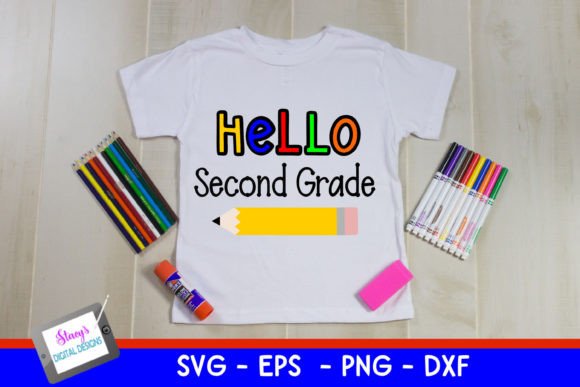
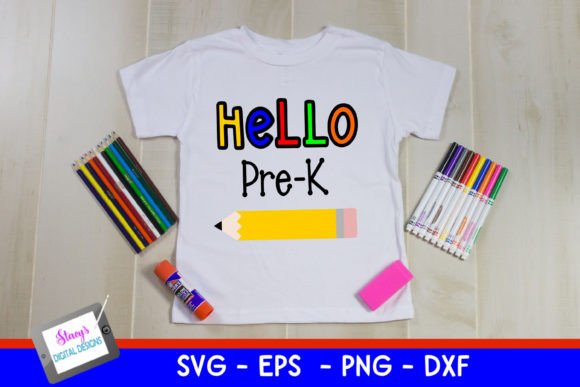
If you're crafting welcome signs, classroom decor, t-shirts for incoming Pre-K families, or personalized keepsakes for your child’s first school year, the Back to School - Hello Pre-K SVG from Stacy’s Digital Designs is a thoughtful, ready-to-use resource. It features clean, friendly lettering with a charming clip art pencil — simple enough for young learners to recognize, polished enough for professional presentation. And it’s not just one file: the zip folder includes SVG, PNG, DXF, and EPS formats — giving you flexibility across cutting machines, design software, and print workflows.
Why This Design Fits Real Needs (Not Just Trends)
This isn’t generic back-to-school clip art. “Hello Pre-K” speaks directly to a meaningful milestone — the transition into formal early learning. Educators use it on bulletin boards and name tags; parents add it to backpack tags and growth charts; small business owners print it on tote bags or mugs for preschool open houses. The pencil icon adds warmth without clutter, and the balanced layout scales well — whether cut at 3 inches for iron-on transfers or enlarged to 24 inches for a classroom door banner.
A Common Misstep: Assuming All File Types Work the Same Way
Many buyers download the zip folder, open the SVG file in Cricut Design Space, and assume the rest will behave identically. That’s where things go sideways. SVG files preserve vector paths and layers — ideal for cutting machines that support grouping and color-based layer separation. But PNGs are raster images: great for digital overlays or sublimation printing, yet they won’t cut cleanly unless traced first. DXF files maintain line integrity for Silhouette Studio and some CAD tools, but often lose text styling or embedded effects. EPS files work in Adobe Illustrator and CorelDRAW but may need manual ungrouping or font substitution if text was converted to outlines inconsistently.
One educator ordered this design to label cubbies — she used the PNG in Canva, resized it freely, then printed on sticker paper. When her students peeled the stickers, edges lifted because the PNG lacked crisp vector edges at that scale. Switching to the SVG and using the “cut” function in Cricut saved her time and material. The lesson? Match the file type to your tool and purpose — not just convenience.
Overlooking Software & Machine Compatibility Upfront
Stacy’s Digital Designs clearly lists compatible formats — but compatibility isn’t just about “opening” a file. It’s about whether your machine interprets layers correctly, honors stroke vs. fill settings, or handles embedded transparency. For example:
- Cricut users: SVG works best when text is outlined and layers are grouped logically. Avoid opening EPS or DXF unless you’re comfortable converting paths manually.
- Silhouette users: DXF preserves line weight and cut order better than SVG in older software versions — especially if you’re using Print & Cut.
- Sublimation or DTG printers: PNG at 300 DPI (included in this pack) is often more reliable than scaling an SVG in a raster editor, which can introduce aliasing.
Before downloading or purchasing, check your software version and machine model. A quick test: import the SVG into your workspace, zoom to 400%, and confirm all lines remain smooth — no pixelation or broken paths. If you see jagged edges or missing elements, your software may need an update or the file may require minor cleanup (which Stacy’s documentation helps with).
Mistaking Simplicity for Limitations
Some creators skip this design because it looks “basic.” But simplicity is intentional — and functional. Unlike overly decorated back-to-school graphics with glitter textures or complex shadows, this Back to School - Hello Pre-K SVG loads quickly, cuts precisely, and adapts easily to color schemes. You can recolor the pencil in seconds, change the font weight without breaking alignment, or isolate the pencil icon to pair with other educational motifs (like apples, books, or ABC blocks).
A small business owner used the pencil alone — recolored in navy and gold — as part of a custom “Pre-K Supply List” PDF. She layered it over a minimalist checklist template and sold it as a digital download. Because the original SVG preserved editable layers, she didn’t need to hire a designer or wrestle with clipping masks. That flexibility saved her hours — and let her pivot fast when demand spiked before August.
What to Verify Before You Use or Share It
Before applying the Back to School - Hello Pre-K SVG to any project, take two minutes to verify these points:
- License scope: Stacy’s Digital Designs offers personal and small commercial licenses — but resale of the raw files (or unaltered digital downloads) isn’t permitted. If you’re creating physical products for sale (e.g., mugs, shirts), you’re covered. If you’re bundling the SVG into a design course or template shop, check the license terms first.
- Font handling: The design uses standard system-safe fonts or outlined text. No external font downloads are needed — but if you plan to edit the text, confirm whether the letters are live type or outlines. In this case, they’re outlined, so editing requires recreating the text — not just typing over it.
- Color mode: For screen use (social posts, email headers), RGB is fine. For professional printing, convert the PNG or exported PDF to CMYK and soft-proof colors — especially if matching school branding.
Better Workflow Starts With Intentional Choices
You don’t need every file type for every project — but knowing which one serves your goal saves time, materials, and frustration. Start by asking: “Will this be cut, printed, or displayed digitally?” Then choose the format accordingly. Test at your intended size. Check layer names in your software — clear naming (e.g., “Pencil,” “Text_Hello,” “Text_PreK”) makes adjustments faster. And if you’re sharing the design with a team or vendor, send the exact file they need — not the whole zip folder — to avoid confusion.
The Back to School - Hello Pre-K SVG stands out not because it’s flashy, but because it’s built thoughtfully — for real people doing real work. Whether you’re a parent prepping for orientation day, a teacher decorating their first Pre-K room, or a creator building seasonal product bundles, its clarity, versatility, and quiet professionalism make it a practical anchor — not just another graphic in your library.